Part 1: Pilot profile. Part 2: Every answer before you buy.
Complete Part 1 (Questions 1–12) to build your Pilot Profile and see your recommended YIVTOL S-Zero model plus smart alternatives — then walk through Part 2 (Questions 13–22) to customize answers on backup safety systems, FAA Part 103 rules, simulator/in-person training, batteries, insurance, financing, and test-flight booking.
Have you flown before?
Helps us tailor cockpit orientation, simulator prep, and how we explain controls.
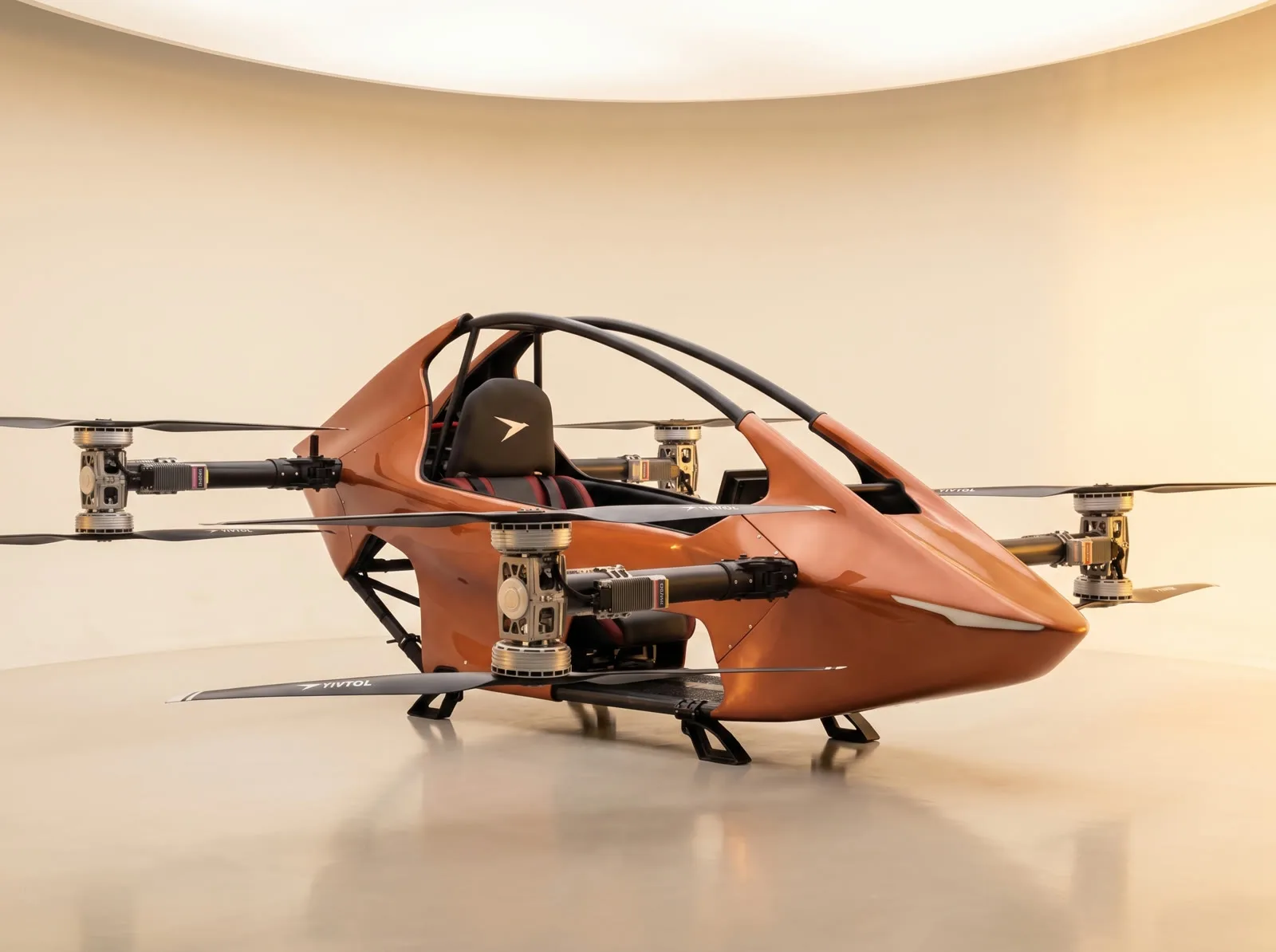
YIVTOL S-Zero Plus
- Flight time
- 25 min
- Max pilot
- 264 lb
- Top speed
- ~60 mph
Your pilot/gear weight band rules out the entry $59,000 S-Zero (198 lb max limit). The YIVTOL S-Zero Plus is our #1 Lower-48 match, giving you full 264 lb coaxial thrust and 25 minutes of flight time for 5–20 mile trips.
- 1Safely accommodates up to 264 lb (120 kg) — the 198 lb S-Zero is automatically ruled out for your profile.
- 225-minute endurance handles both under-5-mile loops and 5–20 mile countryside flights with a 20% reserve.
Ideal if you want to fly right away: skips the $19,900 import package and ships domestically in 1–6 days.
Upgrade to 40-minute flight endurance if you want longer routes between 2-minute battery swaps.
Safety, rules, training & ownership — tailored to you
Select your preferences on each pre-purchase question below. Every question immediately displays a plain-spoken, verified answer right beneath your selection — and compiles into your optional Flight Desk briefing at Question 22.
What matters most to you before buying?
Highlighted focus areas for your Flight Desk briefing: Safety · Rules and licensing · Training. All answers are unlocked and shown below.
Safety: Would you like to know about the backup systems — ballistic parachute, redundant motors, and emergency landing modes?
Rules: Do you know if you'd fly under the FAA ultralight rules (Part 103) or need a pilot certificate?
Plain-English 14 CFR Part 103 summary: Because the YIVTOL S-Zero weighs 253 lb empty (under the 254 lb powered ultralight cap) and carries a single occupant, recreational flyers operate under FAA Part 103 — meaning no pilot certificate, no FAA medical exam, and no N-number aircraft registration are required.
Mandatory operating limits: Single occupant only · Recreation or sport only (no commuting, business, or paid work) · Daylight hours (or 30-min civil twilight in uncontrolled Class G airspace with a 3-SM anti-collision strobe) · No flying over congested cities, towns, neighborhoods, or crowds · Visual meteorological conditions clear of clouds.
Airspace: Would you like to check your flying area with an FAA B4UFLY app or our Google Maps flight planner?
Uncontrolled Class G airspace requires no ATC permission. Controlled airport airspace (Class B, C, D & surface E2) requires prior ATC authorization under 14 CFR § 103.17. Check any pin free in FAA-approved B4UFLY providers (Aloft Air Control, Airspace Link, AutoPylot, uAvionix) or test-plot waypoints right below.
Open flight planner ↓Training: How would you like to learn?
Do you have questions about charging, battery life, or flight time?
• Real-world flight time & 20% reserve rule: Rated endurance is 15 min (S-Zero), 25 min (Plus & Lite), and 40 min (Max). Always plan landings with at least 20% battery reserve (headwinds, high pilot weight, and cold air reduce range).
• 2-minute quick-swap & home/shop charging: Depleted Li-Ion packs unlatch and swap in ~2 minutes. Official spare battery packs are $7,800 and the 240V Dual-Bay Rapid Charger is $2,450 so one set charges while you fly the next.
Do you want details on maintenance, warranty, insurance, or financing?
No oil changes or valve overhauls — check every item below before every flight (and do not fly after any hard landing/damage; call 815-993-0363):
Is there anything that worries you about flying an eVTOL?
• Motor / Battery Redundancy: Eight coaxial brushless motors, dual AI flight computers, low-voltage auto-descent protection, and optional $20k full-airframe ballistic parachute.
• Staying 100% Legal: A 30-second check in Aloft Air Control or Airspace Link confirms uncontrolled Class G airspace and active TFRs before every flight.
Do you have any other questions?
Would you like a call, a demo, or a test flight booked?
Choose your preferred next step and send your completed Part 1 Pilot Profile + Part 2 Questions directly to our human specialists in Ottawa, Illinois. No online deposit is taken.
Know your airspace: B4UFLY & Airspace Link guide
Complete pilot reference and embedded YouTube video training for checking controlled airspace, Temporary Flight Restrictions (TFRs), Military Training Routes, and LAANC authorizations across the Lower 48 states using Airspace Link (AirHub Portal) and all six FAA-approved desktop & mobile B4UFLY applications listed on faa.gov/uas/getting_started/b4ufly.
Build a safe flight plan and navigate airspace
Select a real Lower-48 flying corridor below, inspect live Google Maps satellite terrain alongside B4UFLY / Airspace Link airspace boundaries, plot custom waypoints around controlled airspace and congested areas, verify FAA Part 103 & LAANC compliance, and run a live mission simulation.
1. Ottawa, IL Flagship Flight Center (Illinois River Corridor)
Pre-flight B4UFLY pin verified Clear (Class G). Battery 100% SOH.
Climb to 180 ft AGL cruise altitude over open agricultural acreage.
28° starboard turn maintaining 1.2 NM clearance from Ottawa congested area (§ 103.15).
Remains north of State Park boundary and outside KVYS traffic pattern.
Vertical descent and touchdown on private turf pad. 67% battery reserve remaining.
FAA & B4UFLY guideline checks
Flight path stays at 180 ft AGL inside authorized Class G / LAANC ceiling (400 ft max).
Screened via B4UFLY & Airspace Link — route clears Starved Rock State Park No-Landing Buffer (South).
Waypoints route around Downtown Ottawa Congested Settlement (14 CFR § 103.15) over open terrain.
Daylight operation (Sunrise–Sunset) with 10 SM visibility.
Mission requires 12 min (7 mi), leaving 70% battery reserve.
How to fly legally in the United States — step-by-step instructions
Follow all seven mandatory legal steps below before every flight. This section contains the statutory requirements for Manned FAA Part 103 Ultralight eVTOLs (such as the YIVTOL S-Zero series), Unmanned Recreational Drones (49 U.S.C. § 44809), and Commercial Remote Pilots (14 CFR Part 107).
Identify which Federal Aviation rulebook governs your aircraft
- Manned Personal eVTOL / Ultralight (YIVTOL S-Zero Series): Governed by 14 CFR Part 103 if flown by a single occupant strictly for recreation or sport, with no U.S. or foreign airworthiness certificate, empty weight under 254 lbs (115 kg) excluding floats and emergency safety devices (ballistic parachute & airbag system), max level speed ≤ 55 knots (63 mph), and power-off stall speed ≤ 24 knots (28 mph).
- Unmanned Recreational Drone (Under 55 lbs): Governed by 49 U.S.C. § 44809 (The Exception for Limited Recreational Operations of Unmanned Aircraft) when flown strictly for personal hobby/recreation.
- Unmanned Commercial / Non-Recreational Drone (Under 55 lbs): Governed by 14 CFR Part 107 (Small Unmanned Aircraft Systems) whenever flown for business, compensation, real estate, agriculture, inspection, or any non-recreational purpose.
Complete all required pilot certifications, registration & Remote ID before takeoff
- For Manned FAA Part 103 Ultralight Flight: Under 14 CFR § 103.7, no pilot license, no medical certificate, no airworthiness certificate, and no FAA aircraft registration or N-number markings are required. Complete your factory test-pilot orientation and simulator checkout before solo flight.
- For Unmanned Recreational Flyers (49 U.S.C. § 44809): (1) Pass the free online TRUST (The Recreational UAS Safety Test) exam and carry your digital/printed certificate; (2) Register any drone weighing > 0.55 lbs (250g) at faadronezone.faa.gov ($5 for 3 years) and mark the exterior with your registration number; (3) Comply with Standard Remote ID (14 CFR Part 89).
- For Commercial Part 107 Remote Pilots: (1) Hold a current FAA Part 107 Remote Pilot Certificate (pass the initial UAG knowledge exam at an FAA testing center and complete online recurrent training ALC-677 every 24 months); (2) Register each aircraft individually ($5 per aircraft) on FAA DroneZone; (3) Broadcast Standard Remote ID.
Verify ground takeoff & landing permission (federal vs. state & property law)
- Understand Federal Airspace Preemption vs. Ground Property Rights: The FAA exercises exclusive sovereignty over navigable airspace (49 U.S.C. § 40103), but state/local governments and property owners regulate where aircraft may physically take off and land on the ground.
- Private Property & Ranches: Always launch and land on your own private property or obtain explicit permission from the landowner before operating from private acreage, farms, or estates.
- Federal & State Public Lands: Never launch, land, or operate inside U.S. National Parks (prohibited under NPS Policy Memorandum 14-05 / 36 CFR § 1.5) or designated Federal Wilderness Areas (16 U.S.C. § 1133(c)) without a special federal permit. Check local municipal and state park rules before taking off from public parks.
Screen airspace, TFRs, stadiums & prohibited zones in an official B4UFLY app
- Open an FAA-Approved B4UFLY Application: Launch Airspace Link (AirHub Portal), Aloft (Air Aware), AutoPylot, Avision, FlightLoop, or UASidekick on your desktop browser, iPhone/iPad, or Android device and drop a pin on your exact takeoff coordinates.
- Check Temporary Flight Restrictions (TFRs) & NOTAMs (14 CFR § 103.20): Verify zero active or scheduled TFRs for Presidential/VIP movements (§ 91.141), wildfire/disaster emergency response (§ 91.137), space launches (§ 91.143), or major airshows (§ 91.145).
- Respect Stadium Sporting Event Restrictions (14 CFR § 99.7 / FDC NOTAM): Flight is prohibited within a 3-nautical-mile radius up to 3,000 ft AGL of any stadium with a seating capacity of 30,000+ people hosting an MLB, NFL, NCAA Division I football, or NASCAR/IndyCar event from 1 hour before scheduled start until 1 hour after the event ends.
- Avoid Prohibited & Restricted Areas (14 CFR § 103.19): Never enter Prohibited Areas (such as P-56 / Washington, D.C. Special Flight Rules Area & Flight Restricted Zone) or active military Restricted Areas without controlling agency permission.
Confirm Class G uncontrolled airspace or obtain prior ATC / LAANC authorization
- Flying in Class G (Uncontrolled) Airspace: If B4UFLY / Airspace Link confirms your location is in Class G uncontrolled airspace (typically surface to 700 ft or 1,200 ft AGL away from airports), no Air Traffic Control (ATC) permission or LAANC filing is required.
- Manned Part 103 Ultralight in Controlled Airspace (14 CFR § 103.17): No person may operate an ultralight vehicle within Class A, Class B, Class C, or Class D airspace or within the lateral boundaries of the surface area of Class E airspace designated for an airport unless that person has prior authorization from the ATC facility having jurisdiction over that airspace.
- Unmanned Drones in Controlled Airspace (LAANC): Recreational and Part 107 drone pilots operating in Class B, C, D, or Surface Class E airspace must submit an automated LAANC request via one of the 6 FAA-approved LAANC suppliers at or below the UAS Facility Map (UASFM) ceiling (0–400 ft) and receive FAA authorization before takeoff.
Enforce daylight / civil twilight strobe, surface visibility, cloud clearance & right-of-way rules
- Daylight & Civil Twilight Rule (14 CFR § 103.11): Operate manned Part 103 ultralights only between sunrise and sunset. Flight during civil twilight (30 minutes before official sunrise and 30 minutes after official sunset) is legal only in uncontrolled (Class G) airspace when equipped with an operating anti-collision strobe visible for at least 3 statute miles. Night flight after civil twilight is prohibited for Part 103 ultralights.
- Visual Reference with the Surface & Weather Minimums (§ 103.21 & § 103.23): Maintain continuous visual reference with the ground. In Class G airspace at or below 1,200 ft AGL, maintain at least 1 statute mile flight visibility and stay clear of clouds (we recommend ≥ 3 SM visibility and ≤ 15 mph surface winds).
- See-and-Avoid & Right-of-Way (14 CFR § 103.13): Maintain constant visual vigilance to see and avoid other aircraft. Ultralight vehicles and unmanned drones must always yield the right-of-way to all manned airplanes, helicopters, and gliders.
Never fly over congested areas, open-air crowds, or create a hazard
- No Congested Areas or Open-Air Assemblies (14 CFR § 103.15): Never operate a Part 103 ultralight over any congested area of a city, town, or settlement (dense residential subdivisions, downtown cores, commercial shopping districts, or busy highways), or over any open-air assembly of persons (concerts, festivals, sporting events, beaches, or parades).
- Route Around Settlements Using Google Maps & B4UFLY: Plot your takeoff, cruise, and landing legs over open agricultural fields, ranches, waterways, or uncongested rural corridors with safe forced-landing areas below at all times.
- No Hazardous Operations or Dropped Objects (14 CFR § 103.9): Never operate in a careless or reckless manner that endangers the life or property of another, and never allow any object to be dropped if it creates a hazard to persons or property.
All 13 sections of FAA 14 CFR Part 103 (Ultralight Vehicles) explained
Applicability (5-Point Ultralight Vehicle Definition)
Defines an ultralight vehicle as an aircraft that: (a) is used or intended for manned operation by a single occupant; (b) is used or intended for recreation or sport purposes only; (c) does not have any U.S. or foreign airworthiness certificate; (d) if powered, weighs less than 254 lbs (115 kg) empty weight, excluding floats and safety devices intended for deployment in a potentially catastrophic situation (ballistic parachute & airbags); has fuel capacity ≤ 5 U.S. gallons (or electric battery energy storage); has max level flight speed ≤ 55 knots CAS (63 mph); and has power-off stall speed ≤ 24 knots CAS (28 mph).
Inspection Requirements
Any person operating an ultralight vehicle under Part 103 must, upon request, allow the FAA Administrator or designee to inspect the vehicle to determine whether it is in compliance with Part 103 weight and performance limits.
Waivers
No person may conduct operations that require a deviation from Part 103 rules except under a written waiver issued by the FAA Administrator.
Certification and Registration Exemptions
(a) Ultralight vehicles and their component parts are not required to meet airworthiness certification standards; (b) Operators are not required to meet any aeronautical knowledge, age, or experience requirements or to have airman or medical certificates; (c) Ultralight vehicles are not required to be registered or to bear N-number markings of any type.
Hazardous Operations & Dropping Objects
(a) No person may operate any ultralight vehicle in a manner that creates a hazard to other persons or property. (b) No person may allow an object to be dropped from an ultralight vehicle if such action creates a hazard to other persons or property.
Daylight Operations & Civil Twilight Anti-Collision Light
(a) No person may operate an ultralight vehicle except between the hours of sunrise and sunset. (b) Ultralights may be operated during the twilight periods 30 minutes before official sunrise and 30 minutes after official sunset only if: (1) equipped with an operating anti-collision light visible for at least 3 statute miles, and (2) operated solely in uncontrolled (Class G) airspace.
Operation Near Aircraft; Right-of-Way Rules
(a) Each operator must maintain vigilance so as to see and avoid aircraft and must yield the right-of-way to all certificated aircraft. (b) No person may operate in a manner that creates a collision hazard with any aircraft. (c) Powered ultralights must yield the right-of-way to unpowered ultralights.
Operations Over Congested Areas
No person may operate an ultralight vehicle over any congested area of a city, town, or settlement, or over any open-air assembly of persons.
Operations in Certain Airspace
No person may operate an ultralight vehicle within Class A, Class B, Class C, or Class D airspace or within the lateral boundaries of the surface area of Class E airspace designated for an airport unless that person has prior authorization from the ATC facility having jurisdiction over that airspace.
Operations in Prohibited or Restricted Areas
No person may operate an ultralight vehicle in prohibited or restricted areas unless permission has been obtained from the using or controlling agency, as applicable.
Flight Restrictions in Proximity of NOTAM / TFR Areas
No person may operate an ultralight vehicle in areas designated in a Notice to Air Missions (NOTAM / TFR) under § 91.137 (disaster/wildfire), § 91.138, § 91.141 (Presidential/VIP), § 91.143 (space flight), or § 91.145 (aerial demonstrations/stadiums) unless authorized by ATC.
Visual Reference with the Surface
No person may operate an ultralight vehicle except by visual reference with the surface.
Flight Visibility and Cloud Clearance Requirements
No person may operate an ultralight vehicle when the flight visibility or distance from clouds is less than that specified in the official § 103.23 table (minimum 1 statute mile visibility and clear of clouds in Class G ≤ 1,200 ft AGL; 3 SM visibility and 500 ft below / 1,000 ft above / 2,000 ft horizontal in controlled airspace below 10,000 ft MSL).
Official FAA Part 103 flight visibility & cloud clearance requirements
| Airspace class & altitude band | Minimum flight visibility | Minimum distance from clouds | ATC / LAANC requirement |
|---|---|---|---|
| Class G (Uncontrolled) — At or below 1,200 ft AGL (regardless of MSL altitude) | 1 Statute Mile (3+ SM Recommended) | Clear of Clouds | None — Legal to Fly Without ATC Permission |
| Class G (Uncontrolled) — More than 1,200 ft AGL, but less than 10,000 ft MSL | 1 Statute Mile | 500 ft below · 1,000 ft above · 2,000 ft horizontal | None — Legal to Fly Without ATC Permission |
| Class G (Uncontrolled) — More than 1,200 ft AGL and at or above 10,000 ft MSL | 5 Statute Miles | 1,000 ft below · 1,000 ft above · 1 statute mile horizontal | None — Legal to Fly Without ATC Permission |
| Class E (Surface Area or Transition < 10,000 ft MSL), Class D, or Class C Airspace | 3 Statute Miles | 500 ft below · 1,000 ft above · 2,000 ft horizontal | Prior ATC Authorization (Part 103) or LAANC (Unmanned UAS) |
| Class B Controlled Airspace (Major Primary Airports) | 3 Statute Miles | Clear of Clouds | Prior ATC Authorization (Part 103) or LAANC (Unmanned UAS) |
All 9 mandatory FAA rules for recreational flyers
- 1. Fly strictly for recreational purposes (personal enjoyment — no commercial work or compensation).
- 2. Follow the safety guidelines of an FAA-Recognized Community-Based Organization (CBO).
- 3. Keep your drone within Visual Line of Sight (VLOS) or within the line of sight of a co-located visual observer.
- 4. Give way to and do not interfere with any manned aircraft.
- 5. In Controlled Airspace (Class B, C, D, or Surface E), obtain prior FAA LAANC authorization and stay at or below the UAS Facility Map ceiling.
- 6. In Uncontrolled (Class G) Airspace, fly at or below 400 feet AGL.
- 7. Pass The Recreational UAS Safety Test (TRUST) online (free) and carry proof of passage when flying.
- 8. Register drones weighing > 0.55 lbs (250g) at faadronezone.faa.gov ($5/3 yrs), mark the exterior with your registration number, and broadcast Standard Remote ID (14 CFR Part 89).
- 9. Do not operate your drone in a careless or reckless manner that endangers persons or property.
All 9 mandatory FAA rules for Part 107 remote pilots
- 1. Hold an active FAA Part 107 Remote Pilot Certificate (pass initial UAG knowledge exam at an FAA testing center; complete online recurrent training ALC-677 every 24 calendar months).
- 2. Register each commercial aircraft individually on FAA DroneZone ($5 per drone for 3 years) and broadcast Standard Remote ID (14 CFR Part 89).
- 3. Total aircraft weight (including payload/cameras) must be under 55 lbs (25 kg).
- 4. Maximum groundspeed ≤ 87 knots (100 mph); maximum altitude ≤ 400 feet AGL (or within 400 feet of a structure if higher than 400 ft).
- 5. Minimum flight visibility ≥ 3 statute miles from the control station; cloud clearance ≥ 500 feet below and 2,000 feet horizontally from clouds.
- 6. Maintain Visual Line of Sight (VLOS) unaided by any device other than corrective lenses; yield right-of-way to all manned aircraft.
- 7. Obtain prior LAANC or FAA DroneZone authorization before operating in Class B, C, D, or Surface Class E airspace (§ 107.41).
- 8. Night Operations (§ 107.29): Legal only when the remote pilot has completed current night recurrent training and the aircraft has an anti-collision light visible for at least 3 statute miles flashing at a sufficient rate to avoid collision.
- 9. Operations Over People (§ 107.39 / Subpart D): Prohibited over non-participants unless the aircraft meets Category 1, 2, 3, or 4 crash-energy/propeller-guard requirements.
Approved desktop & mobile applications matrix
| Approved service provider | App on iOS | App on Android | Desktop Web | LAANC supplier | Guide, video & link |
|---|---|---|---|---|---|
Airspace Link (AirHub Portal) Featured partner · Desktop & mobile | iOS | Android | Desktop | LAANC | |
Aloft (Air Aware) Desktop & mobile | iOS | Android | Desktop | LAANC | |
AutoPylot Desktop & mobile | iOS | Android | Desktop | LAANC | |
Avision Desktop & mobile | iOS | Android | Desktop | LAANC | |
FlightLoop Desktop web application | — | — | Desktop | LAANC | |
UASidekick Desktop & mobile | iOS | Android | Desktop | LAANC |
Airspace Link (AirHub Portal)
Airspace Link’s AirHub Portal is the flagship FAA-approved B4UFLY and LAANC platform for desktop browsers, iOS, and Android. Built for recreational flyers, Part 107 remote pilots, and ultralight/personal drone operators seeking high-resolution ground and airspace risk intelligence.
Full-screen desktop mission planning + mobile field checkouts & near-real-time LAANC authorizations
Open AirHub Portal on Desktop (airspacelink.com/pilots) or download "AirHub Portal" on iOS App Store / Google Play.
Drop a location pin or type your property address / GPS coordinates in the top search bar.
Inspect the status banner at the top left: Clear (Uncontrolled Class G), Controlled Airspace / Advisory (LAANC Required), or Restricted (Active TFR / No-Fly Zone).
Toggle map layers for FAA UAS Facility Maps (altitude ceilings from 0 ft to 400 ft), Temporary Flight Restrictions (TFRs), Military Training Routes (MTRs), and National Parks.
If flying in controlled airspace (Class B, C, D, or Surface E), click "Plan Flight / Request LAANC", draw your flight polygon, set altitude & time window, and submit for instant automated FAA approval.
Complete operating instructions for every FAA B4UFLY application
All step-by-step instructions for every desktop and mobile B4UFLY / LAANC application listed on faa.gov/uas/getting_started/b4ufly are displayed below for immediate reference.
Airspace Link (AirHub Portal)
Airspace Link’s AirHub Portal is the flagship FAA-approved B4UFLY and LAANC platform for desktop browsers, iOS, and Android. Built for recreational flyers, Part 107 remote pilots, and ultralight/personal drone operators seeking high-resolution ground and airspace risk intelligence.
Open AirHub Portal on Desktop (airspacelink.com/pilots) or download "AirHub Portal" on iOS App Store / Google Play.
Drop a location pin or type your property address / GPS coordinates in the top search bar.
Inspect the status banner at the top left: Clear (Uncontrolled Class G), Controlled Airspace / Advisory (LAANC Required), or Restricted (Active TFR / No-Fly Zone).
Toggle map layers for FAA UAS Facility Maps (altitude ceilings from 0 ft to 400 ft), Temporary Flight Restrictions (TFRs), Military Training Routes (MTRs), and National Parks.
If flying in controlled airspace (Class B, C, D, or Surface E), click "Plan Flight / Request LAANC", draw your flight polygon, set altitude & time window, and submit for instant automated FAA approval.
Aloft (Air Aware)
Aloft (the original engineering partner behind the legacy FAA B4UFLY app) offers Air Aware for real-time B4UFLY situational awareness alongside Aloft Air Control for automated LAANC authorizations and fleet telemetry.
Launch Air Aware on the web (airaware.aloft.ai) or install the Aloft Air Aware mobile app on iOS or Android.
Pan the map to place the target reticle over your intended takeoff and landing zone.
Review the instant B4UFLY status card showing active advisories, nearby heliports, airports, and special use airspace.
Use the time-slider to preview upcoming TFRs or scheduled airspace restrictions up to 24–72 hours in advance.
Link with Aloft Air Control to submit recreational or commercial LAANC requests in controlled airspace.
AutoPylot
AutoPylot delivers a streamlined, pilot-first B4UFLY and LAANC experience across iOS, Android, and desktop web browsers, combining airspace advisories with localized aviation weather, wind profiles, and pre-flight checklists.
Access AutoPylot via web browser or install the AutoPylot B4UFLY & LAANC app on iOS / Android.
Tap the map or search an address across the Lower 48 states to load the local B4UFLY status badge.
Swipe up on the Airspace Drawer to view overlapping layers (Class B/C/D/E ceilings, stadium TFRs, critical infrastructure).
Check the built-in Aviation Weather tab for surface wind speed, gusts, visibility, and twilight times.
Tap "Get LAANC Approval" if operating within an airport UAS Facility Map grid.
Avision
Avision provides FAA-approved B4UFLY situational awareness and LAANC authorization tools on iOS, Android, and desktop web, featuring 3D airspace visualization, flight path conflict detection, and multi-layer aeronautical charts.
Open Avision FAA Services on desktop (avision.io/faa-services) or launch the Avision mobile app.
Select "B4UFLY Check" to view airspace polygons around your GPS position.
Click any airspace polygon to read exact floor/ceiling altitudes, controlling ATC facility, and operating rules.
Define a flight volume circle or polygon to validate compliance and submit automated LAANC requests.
FlightLoop
FlightLoop is an FAA-approved desktop web B4UFLY and LAANC UAS Service Supplier designed for browser-based pre-flight planning, instant facility map inspection, and online LAANC authorization management.
Navigate to flightloop.co/laanc on any desktop or laptop web browser.
Enter your flight location address, city, or coordinates to center the interactive B4UFLY map.
Verify the B4UFLY safety indicator and inspect UAS Facility Map grid maximum altitudes.
Submit recreational or Part 107 LAANC authorization requests directly from your browser dashboard.
UASidekick
UASidekick offers FAA-approved B4UFLY and LAANC services on iOS, Android, and desktop web, simplifying airspace situational awareness, NOTAM/TFR alerts, and digital flight log keeping.
Open uasidekick.com/b4ufly_laanc on desktop or launch the UASidekick app on iOS / Android.
Drop a pin on your takeoff site to view the B4UFLY status indicator (Clear, Caution, or Restricted).
Review nearby airports, heliports, national security areas, and Temporary Flight Restrictions.
File a LAANC authorization or log your flight mission for personal airframe and battery tracking.
Flying with Airspace Link (AirHub Portal)
Airspace Link’s AirHub Portal combines official FAA B4UFLY situational awareness, UAS Facility Maps, and automated LAANC authorizations into one unified desktop and mobile cockpit.
AirHub Academy – Introduction to AirHub Portal
Official walkthrough of Airspace Link’s AirHub Portal covering B4UFLY airspace advisories, map layers, and pre-flight planning on desktop and mobile.
Airspace Link – AirHub Portal Complete Workflow Demo
Live demonstration of Airspace Link’s AirHub Portal showing end-to-end flight geometry drawing, TFR screening, and automated FAA LAANC approvals.
Account & pilot profile setup
Visit airspacelink.com/pilots on desktop or install "AirHub Portal" on iOS/Android. Create a free pilot profile and enter your contact phone number (required by the FAA when submitting LAANC notifications).
Location pin & address lookup
Use the Search Bar or click/tap directly on the map to drop a pin on your ranch, driveway, or flying field. The B4UFLY status widget immediately evaluates all overlapping airspace layers.
Layer & hazard inspection
Open the Map Layers drawer to inspect Controlled Airspace (Class B/C/D/E), UAS Facility Map altitude grids (0–400 ft), active & upcoming TFRs, National Parks, Stadiums, and Military Training Routes (MTRs).
Time-slider future planning
Adjust the date and time selector before your flight day to verify whether scheduled TFRs (such as VIP visits, airshows, or stadium games) will activate during your planned takeoff window.
Drawing flight geometry & LAANC
For UAS flights in controlled airspace, click "Create Operation", draw a polygon or radius around your flight area, set your maximum altitude at or below the UASFM grid ceiling, and submit for instant LAANC approval.
Field checkout & SMS confirmation
Receive your FAA LAANC authorization code via SMS/email and inside the AirHub mobile app. Keep your phone audible during flight in case Air Traffic Control issues an airspace advisory.
YouTube instructional videos (9 tutorials)
Watch step-by-step video tutorials directly below or open them on YouTube to master Airspace Link (AirHub Portal), B4UFLY map advisories, Aloft Air Control, AutoPylot, UASidekick, Avision, and FAA LAANC authorizations.
AirHub Academy – Introduction to AirHub Portal
Official walkthrough of Airspace Link’s AirHub Portal covering B4UFLY airspace advisories, map layers, and pre-flight planning on desktop and mobile.
Airspace Link – AirHub Portal Complete Workflow Demo
Live demonstration of Airspace Link’s AirHub Portal showing end-to-end flight geometry drawing, TFR screening, and automated FAA LAANC approvals.
B4UFLY App Tutorial – 2026 Complete Pilot Guide
Updated step-by-step instructional guide explaining how to check controlled airspace, TFRs, and "Clear to Fly" status across FAA-approved B4UFLY apps.
Fly Smart, Fly Safe: Step-by-Step Tutorial for B4UFLY
Practical pilot training session on interpreting B4UFLY map pins, airport UAS Facility Map altitude ceilings, and special use airspace.
How to Use Aloft Air Control & Air Aware (Full Tutorial)
Complete walkthrough of Aloft’s B4UFLY situational awareness interface and submitting automated LAANC requests in controlled airspace.
Getting Started With AutoPylot (B4UFLY & LAANC)
Official AutoPylot onboarding tutorial demonstrating B4UFLY status checks, localized wind/weather telemetry, and 1-tap LAANC authorizations.
UASidekick – How to File a LAANC & Check Airspace
Official UASidekick tutorial walking through pin-drop airspace checks, NOTAM lookups, and filing recreational or commercial LAANC requests.
How To Get FAA Airspace Authorization Using LAANC
Detailed instructional breakdown of how FAA LAANC works across Class B, C, D, and Surface E airspace using approved desktop and mobile suppliers.
How To Use LAANC and FAA DroneZone for Airspace Authorizations
Step-by-step desktop tutorial comparing instant LAANC grid approvals with FAA DroneZone airspace coordination.
How to read B4UFLY map advisories
No controlled airspace or active TFRs detected at your pin. Standard operating rules apply: maintain visual line of sight / see-and-avoid, stay away from congested areas, and respect local property and altitude limits.
Location lies within controlled airspace around an airport. Recreational & Part 107 drones must obtain automated LAANC authorization up to the UAS Facility Map ceiling (0–400 ft) before takeoff. Manned Part 103 ultralights require prior ATC authorization before entering Class B, C, D, or surface Class E airspace.
Flight is strictly prohibited without special federal waiver/authorization. Examples include the Washington, D.C. Special Flight Rules Area (SFRA), active VIP/Presidential TFRs, stadium TFRs, wildfire firefighting zones, National Parks, and military restricted areas.
Manned FAA Part 103 ultralight vs. unmanned UAS (Part 107 / 44809)
While B4UFLY and Airspace Link are essential situational awareness tools for every pilot on DroneSales.bid, understand which FAA rulebook governs your aircraft:
- 1. YIVTOL S-Zero Personal eVTOL (14 CFR Part 103)Flown with a human pilot onboard under FAA Part 103 Ultralight Vehicle rules. No pilot license, medical, or registration required. Fly in Class G uncontrolled airspace during daylight hours (or civil twilight with a 3-SM anti-collision strobe) away from congested areas. Use B4UFLY / Airspace Link to verify you are outside Class B/C/D/E airspace, TFRs, and Prohibited areas.
- 2. Unmanned Recreational & Commercial Drones (USC 44809 / Part 107)Unmanned aircraft under 55 lbs require TRUST (recreational) or a Part 107 Remote Pilot Certificate (commercial), Remote ID compliance, and LAANC authorization via Airspace Link, Aloft, AutoPylot, Avision, FlightLoop, or UASidekick when operating in controlled airspace.
B4UFLY & Airspace Link pre-flight checklist
1. Verify Aircraft Rulebook & Weight Qualification (14 CFR § 103.1 / § 44809 / Part 107)
For manned YIVTOL S-Zero Part 103 flight: confirm single-occupant recreational/sport mission and < 254 lb empty weight (excluding ballistic parachute & safety devices). For unmanned UAS: confirm TRUST certificate (recreational) or Part 107 license (commercial), FAA registration marking, and active Standard Remote ID.
2. Confirm Landowner / Ground Takeoff & Landing Permission
Verify you are launching and landing on your own private property, private ranch/acreage with explicit landowner permission, or an approved flight park — and not inside a U.S. National Park (36 CFR § 1.5) or Federal Wilderness Area.
3. Pin Takeoff Location in B4UFLY / Airspace Link AirHub
Search your exact property address or GPS coordinates and verify the status indicator is Clear (Class G Uncontrolled Airspace) or identify the controlled airspace class.
4. Screen for Active & Upcoming TFRs & Stadium Restrictions (14 CFR § 103.20 / § 99.7)
Check for VIP/Presidential movements, stadium events (3 NM radius up to 3,000 ft AGL from 1 hr before to 1 hr after MLB, NFL, NCAA Div I, or NASCAR/IndyCar events), wildfires, or emergency response operations.
5. Verify Special Use Airspace, Prohibited Areas & Military Routes (14 CFR § 103.19)
Ensure your flight path stays clear of Prohibited/Restricted areas (such as the Washington, D.C. SFRA/FRZ), National Security Areas, low-altitude Military Training Routes (MTRs), and critical infrastructure.
6. Obtain LAANC or Prior ATC Airspace Authorization if Required (14 CFR § 103.17)
In Class G uncontrolled airspace, no ATC permission is required. For UAS flights in Class B, C, D, or Surface Class E airspace, use Airspace Link, Aloft, AutoPylot, Avision, FlightLoop, or UASidekick to obtain LAANC authorization below the UASFM ceiling. For manned Part 103 flight in Class B/C/D/Surface E, obtain prior ATC facility authorization.
7. Confirm Daylight / Civil Twilight Strobe & Visibility Rules (14 CFR § 103.11 & § 103.23)
Operate between sunrise and sunset (or during civil twilight ±30 min in Class G with an active 3-statute-mile anti-collision strobe). Confirm ≥ 1–3 statute miles visibility, required cloud clearance, and continuous visual reference with the surface (§ 103.21).
8. Plot Flight Path Clear of Congested Areas & Open-Air Crowds (14 CFR § 103.15)
Confirm your takeoff, cruise, and landing waypoints stay over open rural/uncongested terrain and never pass over any congested area of a city, town, settlement, or open-air assembly of people.
9. Complete Airframe, Rotor, Parachute & Battery Telemetry Walkaround
Confirm foldable rotor booms are locked with safety pins engaged, carbon propellers are undamaged, ballistic parachute safety pin is briefed, battery state-of-health (SOH) is verified with ≥ 20% planned landing reserve, and surface winds are within pilot limits.
10. Maintain See-and-Avoid Vigilance & Yield Right-of-Way In Flight (14 CFR § 103.13)
Throughout the flight, scan visually for manned aviation traffic, yield the right-of-way to all airplanes, helicopters, and unpowered ultralights, and never drop any object or operate in a hazardous manner (§ 103.9).
Pilot onboarding safety standard & preflight rules
Safety on every flight: coaxial redundancy, preflight discipline, and Part 103 limits
Every YIVTOL S-Zero allocation on DroneSales.bid is matched to your pilot weight envelope, backed by 8-motor coaxial propulsion and AI attitude stabilization, and paired with a 6-point preflight checklist and Class G airspace rules.
8 coaxial motors + titanium & carbon frame
Eight brushless electric motors mounted on four coaxial booms pair with an extra-high-strength titanium tube and carbon-fiber cockpit structure built within the 253 lb FAA Part 103 airframe limit.
AI-stabilized joystick & 60 mph governor
Redundant onboard flight computers stabilize pitch, roll, and altitude while software-limiting top level speed to ~60 mph inside 14 CFR Part 103 limits.
Optional ballistic parachute & cockpit airbag
Available as a $20,000 factory safety option on new builds — and pre-installed on select pre-owned allocations — for whole-airframe emergency descent protection.
Strict pilot weight matching & simulator prep
We enforce strict pilot weight limits (198 lb max on base S-Zero; 264 lb max on Plus, Lite, and Max) and coordinate Ottawa, IL simulator and test-pilot training before solo flight.
Mandatory 6-point preflight checklist
14 CFR Part 103 · Daylight VFR · Single occupant · Zero congested areas- 1. Boom pins lockedConfirm all four folding carbon rotor booms are seated and locking pins are fully engaged.
- 2. Eight coaxial props undamagedInspect all eight upper and lower carbon-fiber blades for nicks, cracks, or fastener play.
- 3. Parachute pin briefedOn ballistic parachute and airbag-equipped units, verify safety pin status and cockpit handle path.
- 4. 20% minimum landing battery reserveConfirm cell balance and plan flight duration so you touch down with at least 20% charge remaining.
- 5. Winds and density altitude checkedVerify calm daylight VFR conditions, gust spread, and local temperature/elevation thrust margin.
- 6. Class G airspace verified in B4UFLYCheck Airspace Link AirHub or Aloft for uncontrolled Class G airspace, zero active TFRs, and clear departure paths.
Post-Incident & Hard-Landing Rule: Never fly an aircraft after any hard landing, prop strike, or fault alert. Ground the unit immediately and contact our Flight Desk (if anyone is injured, call 911 first).
Flight Safety Desk: 815-993-0363Explore all 9 new, demo & pre-owned eVTOL listings
Compare Instant Market Value (IMV) deal ratings, calculate state delivery, or submit a live bid on pre-owned and demo aircraft.